UFS How can I see my total spending for the last month?
Modified on Wed, 4 Nov at 1:00 PM
This article is about Unzer Financial Services – click here to view the entire collection on this topic.
How to find your total spending for last month
You can view your total spending for the previous month directly in the Admin Dashboard and download the data if needed.
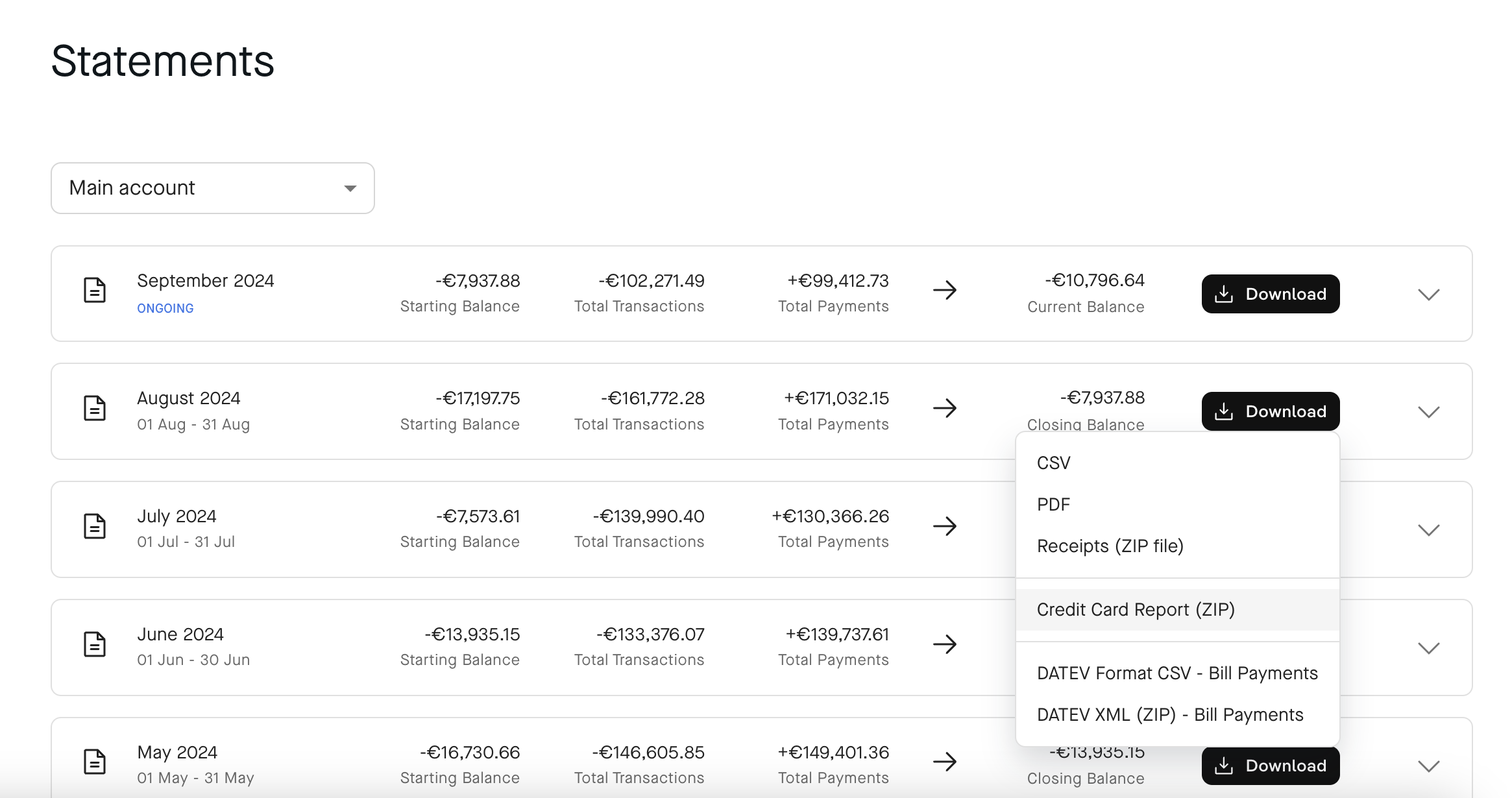
1. Open Billing statements
- Open Billing statements in the Admin Dashboard.
- Select the monthly billing period you want to review.
2. Check your total spending
- Open the statement for the previous month.
- Here you can see the total value of your transactions, as well as your opening and closing balance and payments for the selected period.
3. Download your statement
Select Download. Depending on what you need, you can download:
- PDF for your monthly statement
- CSV file for a more detailed analysis of your spending
Tip: The CSV file is particularly useful for detailed reporting and analysis, for example by card, cardholder or team.
Was this article helpful?
That’s Great!
Thank you for your feedback
Sorry! We couldn't be helpful
Thank you for your feedback
Feedback sent
We appreciate your effort and will try to fix the article