Install the Datalogic 2D scanner
Modified on Mon, 16 Feb at 10:11 AM
A PDF for printing and scanning is available here:
How to connect the scanner to your iPad:
- Open Settings on your iPad and select Bluetooth.
- Make sure Bluetooth is enabled.
- Scan the following barcodes.
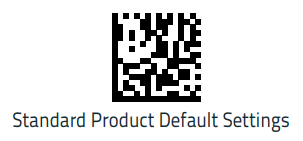
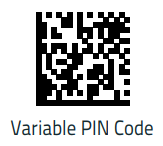
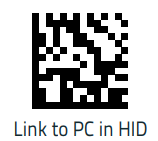
Please note:
You will hear two audio signals. Only scan the next code after you hear the second signal.
- In your iPad’s Bluetooth settings, connect to the scanner named “QuickScann…”.
- You will then be prompted to scan a code. Use the codes on the next two pages.
Please note:
You will hear only one signal each time.
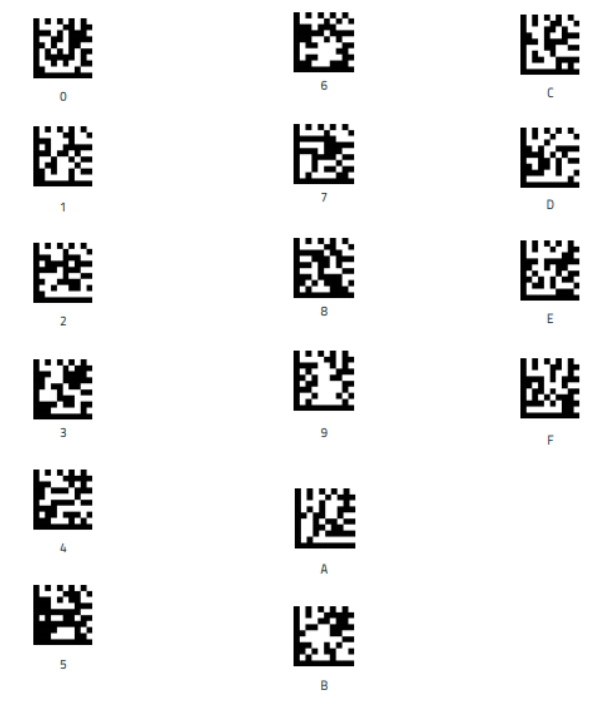
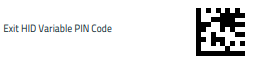
Confirm your input by scanning the following code.
Please note: If you wait too long, you will need to repeat the entry.
Anleitung Datalogic 2D Scanner
Was this article helpful?
That’s Great!
Thank you for your feedback
Sorry! We couldn't be helpful
Thank you for your feedback
Feedback sent
We appreciate your effort and will try to fix the article
