Install the SUPERLEAD scanner
Modified on Thu, 10 Sep at 7:26 AM

The PDF for scanning and printing is available here:
General note: The SUPERLEAD scanner must be charged with a power adapter that provides at least 2 A.
Before you begin, please connect the charging cradle (holder) of the scanner to the power supply. The scanner should be charged for at least one hour before you put it into operation. The indicator light on top of the scanner shows the charging status: if it lights up red, the battery is still empty; if it lights up green, the scanner is fully charged.
Once the scanner is charged, switch it on by holding down the scan button (trigger) for approximately 3 seconds until the scanner signals with a beep that it is ready for use. Then scan the enclosed barcode (see above). You should hear another beep confirming this.
As a final step, go to the iPad settings and then to "Bluetooth". There you will find the scanner in the list of available devices and can easily connect it.
Note: If you cannot scan the barcode, print the guide or increase your screen brightness to reduce reflections.Add-on: If you want to change the keyboard layout language, first scan the “Bluetooth keyboard” barcode and then scan the barcode for your desired language.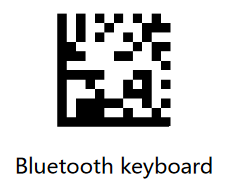
Was this article helpful?
That’s Great!
Thank you for your feedback
Sorry! We couldn't be helpful
Thank you for your feedback
Feedback sent
We appreciate your effort and will try to fix the article
