Login with Email, Password and Two-Factor Authentication
Modified on Thu, 24 Sep at 10:38 AM
Securely Access Your Unzer Financial Services Account
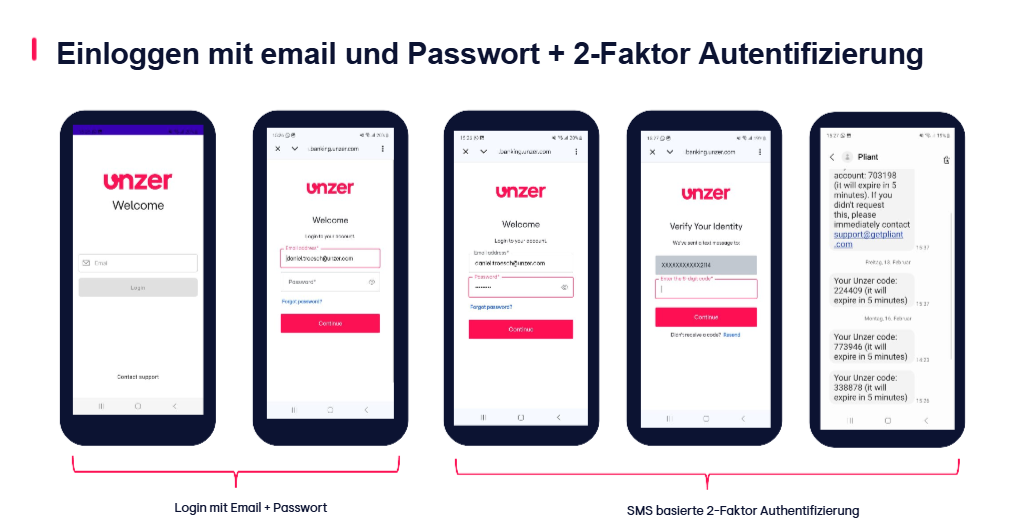
Log in using your registered email address and password. To help protect your account, we use an additional two-factor authentication step via SMS.
How It Works
1. Enter Your Email Address
Use the email address associated with your Unzer Financial Services account.
2. Enter Your Password
Enter your password and select Continue.
3. Receive a Security Code by SMS
Once your login details have been verified, a one-time security code will be sent to your registered mobile number.
4. Enter the Verification Code
Enter the SMS code to confirm your identity.
5. Access Your Account
After successful verification, you'll be logged in and redirected to your account dashboard.
Good to Know
Your SMS verification code is only valid for a limited time. If you don't receive the code, you can request a new one.
Was this article helpful?
That’s Great!
Thank you for your feedback
Sorry! We couldn't be helpful
Thank you for your feedback
Feedback sent
We appreciate your effort and will try to fix the article
