Inventory Management of Your Ingredients
Modified on Wed, 25 Feb at 12:28 PM
What is an "Item with Ingredients"?
The "Item with Ingredients" feature allows you to break down the dishes you offer into their individual components. Mixed drinks or snacks that are made up of various individual components, such as long drinks or burgers, are ideal for being represented as an "Item with Ingredients".
This way, the individual ingredients can be inventoried and tracked independently of the sold end product.
Creating an "Ingredient"
With the "Item with Ingredients" feature, a new product type has been introduced: the so-called "Ingredient".
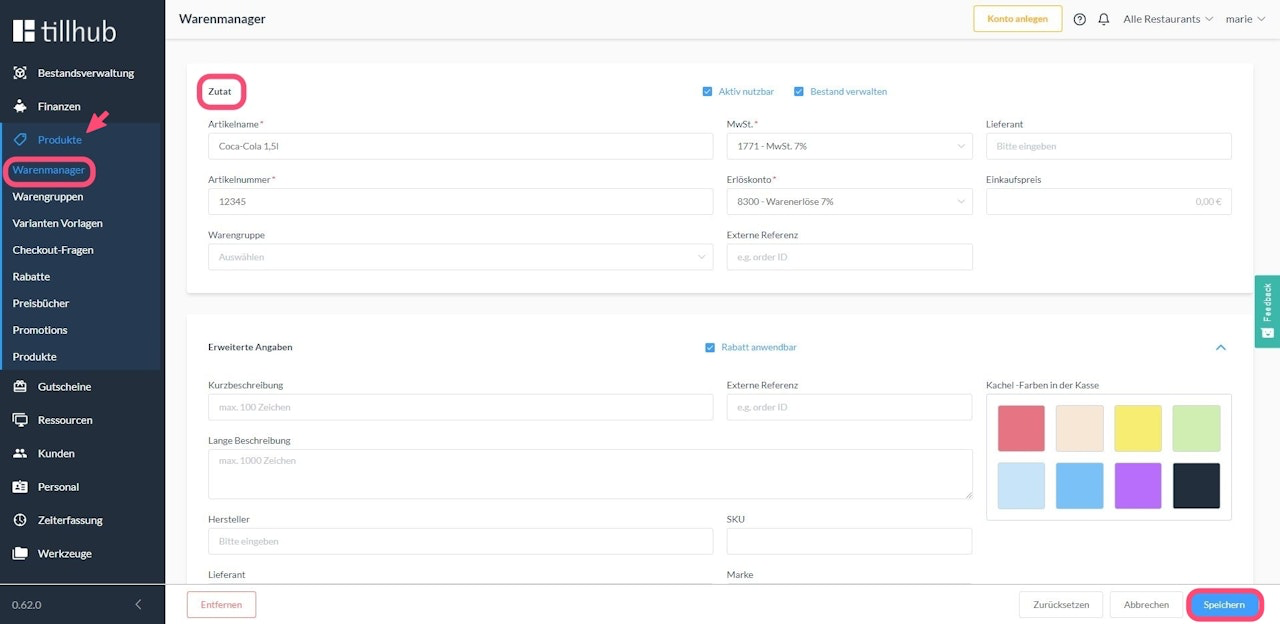
For example, if you create a 1.5l bottle of Coca-Cola as an "Ingredient", this bottle is not listed as a sales item, but serves solely as a component of your "Item with Ingredients", which could be a mixed drink that you offer for sale.
To create an "Ingredient", click on Products in the main menu of your dashboard. Then navigate to Inventory Manager and click on the Ingredient tab. Create the item with the appropriate name and assign it an item number. Link the item to a VAT and revenue account and then click the Save button at the bottom right.
Creating an “item with ingredients”
To create a smoothie, such as a strawberry-mango smoothie, as an “item with ingredients,” you must create an “item with ingredients” with the appropriate name and the associated revenue and VAT accounts. In the “Compile item” box below, create a list of the corresponding ingredients.
Strawberry juice 1.5l
Enter the value 0.13 as the quantity, which is calculated as follows: If our bottle of strawberry juice contains 1.5 l, the value 0.13 represents approx. 200 ml: 0.13 x 1.5 = 0.195.
Mango juice 1 l
Enter the value 0.03 as the quantity, which is calculated as follows: If our bottle of mango juice contains 1 liter, the value 0.03 stands for 30 ml: 1.0 x 0.03 = 0.03. When we sell a mango juice via the IMS (Inventory Management System), the corresponding ingredients are deducted from the inventory accordingly.


Was this article helpful?
That’s Great!
Thank you for your feedback
Sorry! We couldn't be helpful
Thank you for your feedback
Feedback sent
We appreciate your effort and will try to fix the article
