Create discounts
Modified on Mon, 16 Feb at 10:11 AM
In the menu “Items > Discounts”, discounts can be created independently. These can be either absolute or percentage-based discounts and can be applied either to a single item or to the entire cart.
In addition, specific discounts can be assigned to certain customers—for example, a student discount for a student. Whether an employee can create and apply discounts depends on whether the corresponding permissions have been granted to their staff profile in the dashboard.
By default, the following discounts are preconfigured in the Tillhub dashboard. They can be removed or adjusted by the user:
- Bonus 500 euros (cart and line-item discount)
- Bonus 0 euros (cart and line-item discount where the value can be entered manually)
- Discount 10% (cart and line-item discount)
- Customer discount 0% (cart and line-item discount where the value can be entered manually)
- Discount 0% (cart and line-item discount where the value can be entered manually)
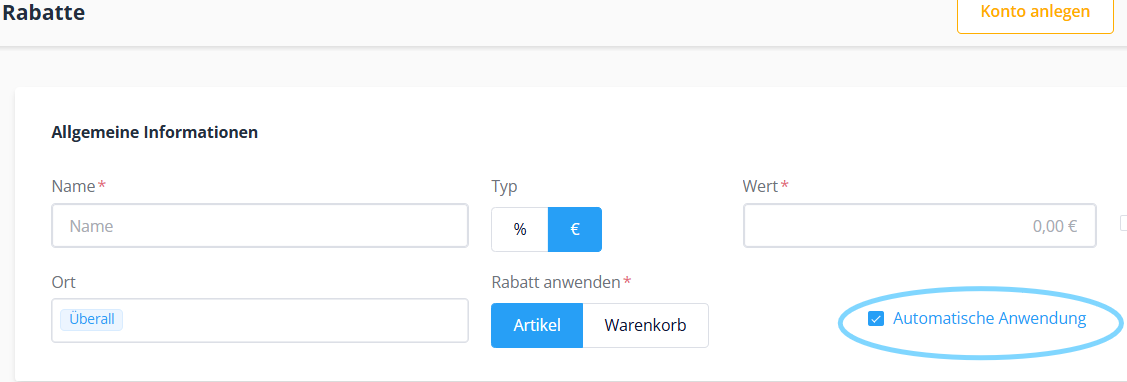
When creating discounts, you can decide whether they should be applied automatically or not. If the end user chooses automatic application, they can additionally specify whether the automatic application of a discount is only possible within a certain time window and whether it should apply exclusively to products with a specific VAT rate, certain product groups, or only individual items. If the end user selects an item at the checkout that is linked to an active automatic discount, the item will immediately appear discounted in the cart.
If discounts are created in the dashboard that are not to be applied automatically, they must be added manually to the respective items during the checkout process. For these manually applicable discounts, it can also be configured in the dashboard whether they can only be used within a certain time window and whether they should apply exclusively to products with a specific VAT rate, certain product groups, or only individual items.
If you want a discount to be applied automatically, enable the option automatic application. You can also create a new discount campaign at any time, define a date range, and activate automatic application. This ensures that the discount is applied automatically only within the specified period.
Was this article helpful?
That’s Great!
Thank you for your feedback
Sorry! We couldn't be helpful
Thank you for your feedback
Feedback sent
We appreciate your effort and will try to fix the article
